
The “AI Design Feedback” is a feature that will enable you to get immediate AI-generated feedback for your newly planned campaign designs - what areas need work and what are the actionable steps required to fix the problems.
Using the AI Design Feedback Tool
Step 1: Select the AI Design Feedback
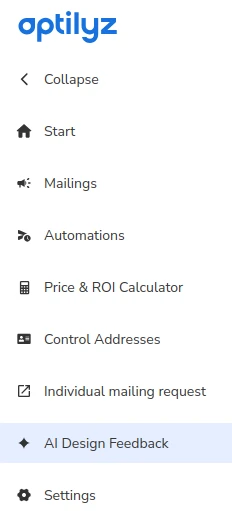
Here you can browse all your previous feedback requests or create a new one.
Step 2: Request new feedback
To request AI-generated feedback for your design, you upload it as a PDF file and specify a few additional details: delivery country, campaign type (one-time vs recurring), use case and mailing format. You can also name your feedback request for easy identification in the future (otherwise it’s gonna be represented as the filename of the file you uploaded).
Remember that the result is AI-generated, with all the usual limitations of large language model output. Also, make sure there's no Personally Identifiable Information within the submitted design.
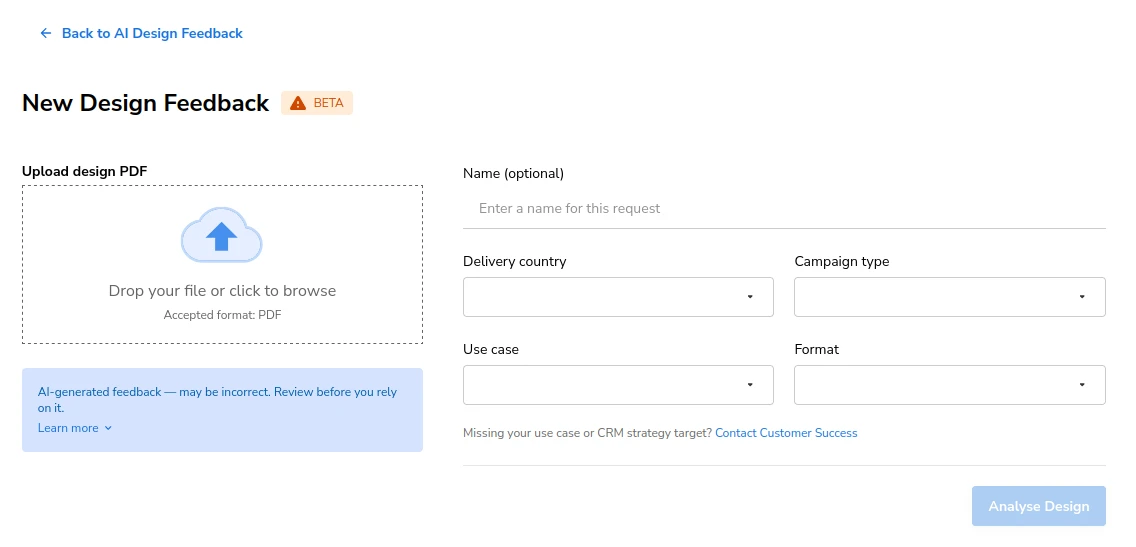
After submitting, the generation of the feedback takes usually under a minute.
Step 3: Receive feedback
The produced feedback rates your design in 6 categories:
- Overall Strategy & CTA
- Personalisation
- Text and Messaging
- Visual Layout & Eye Flow
- Voucher and Incentive
- Format-Specific Execution
In every category the design may be rated as “Strength”, “Mixed” or “Needs work” and the text provides suggestions for fixes.
At the bottom you are presented with the general summary.
After perusing the feedback, please let us know how you liked it using the thumbs up/down button - we want to know if the feature is useful for you!